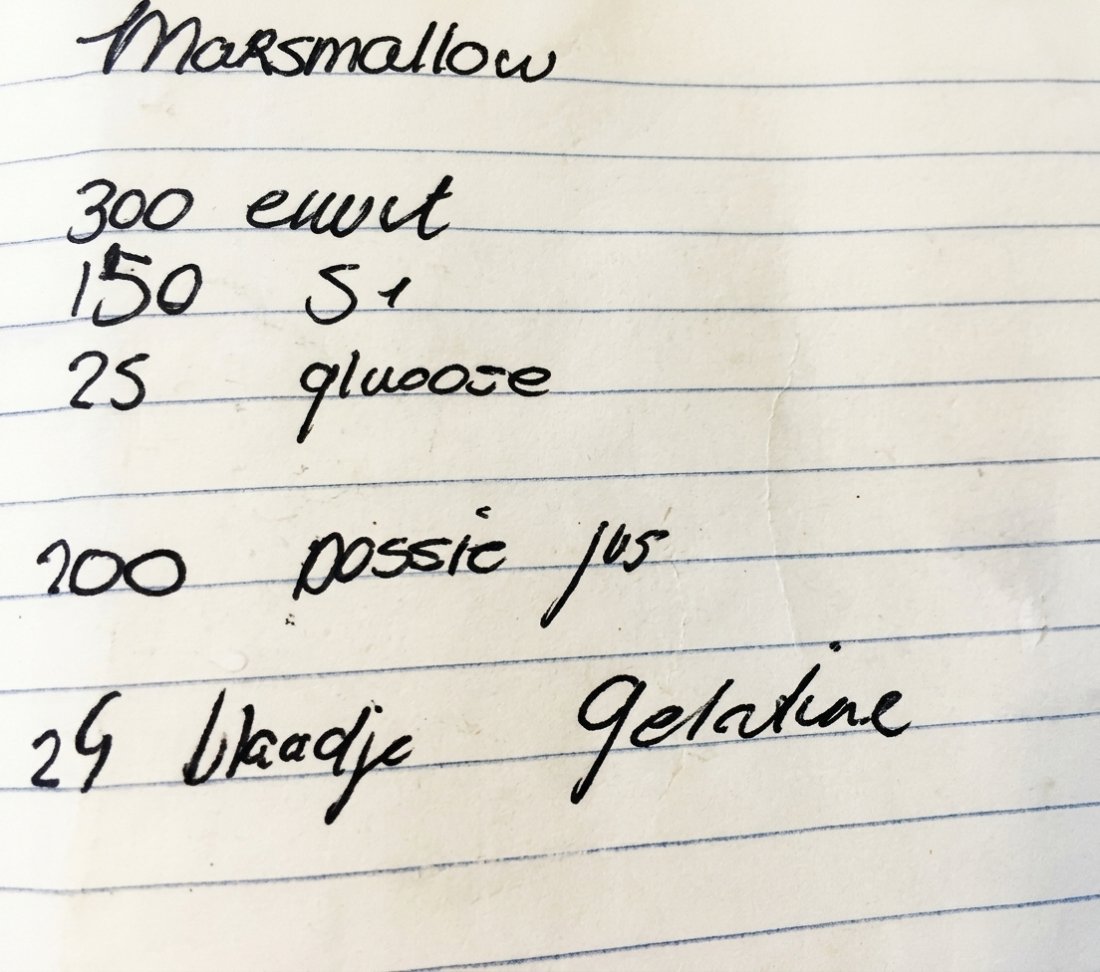
Marshmallow
PastryIngredients
- 300 g egg white
- 150 g sugar
- 25 g glucose
- 200 g passion fruit juice
- 48 g gelatine
Method
- Soak the gelatine. Soak the gelatine leaves in plenty of cold water.
- Cook the sugar syrup. Put the sugar, glucose syrup and the water in a pan. Bring to the boil and cook to about 121 °C.
- Whisk the egg white. Start whisking the egg white as soon as the syrup is almost at temperature. Whisk to a light foam that is still supple enough to take the hot syrup.
- Add the syrup. Pour the hot syrup in a thin stream into the whisking egg white. Pour down the inside of the bowl, not straight onto the whisk, to limit splashes and sugar crystals.
- Dissolve the gelatine. Gently melt the squeezed gelatine in the passion fruit coulis. Add it to the warm marshmallow mixture while the mixer is running. Keep whisking until the mixture is light and starts to cool, but is still liquid enough to work with.
The method was not on the note. The chef added it: Savour never makes anything up.
Word and PDF in one go
Drop a Word file or PDF into Savour, even if it holds hundreds of recipes. The Savour reader works out where each recipe starts and ends, and puts the title, ingredients and method in the right place. Numbers before titles and small typos such as 18oc instead of 180°C are cleaned up. One chef imported 1,400 recipes this way in about two minutes.
Handwritten recipes and photos
Take a photo of a note, a page from your notebook or a scan from an old binder. The AI reads the handwriting and turns it into a clean recipe, even when the photo is crooked or the paper is stained. This is part of Savour Pro.
Order in large, messy recipe folders
A binder with hundreds of recipes from different chefs, with numbers, loose headings and recipes that start halfway down a page? Savour splits them up itself, recognises parts such as dough and filling, corrects common spelling mistakes and suggests a category for each recipe. Recipes the reader is unsure about are read again by the AI with Savour Pro. You check everything in one overview before it is saved.
Nothing made up
A recipe has to be right. Savour never invents quantities, ingredients or steps. If the reader is unsure, the recipe is flagged and you check it yourself before it is saved.
From a website or another app
Paste the link to a recipe on a website and Savour pulls out the recipe. Moving from another recipe app, such as Paprika, Mealie, Tandoor, Recipe Keeper, Crouton, MasterCook, Copy Me That or Plan to Eat? Make an export there and bring the file into Savour in one go.
Then simply carry on
Every imported recipe can be edited, given a photo, put in a folder and shared with your brigade.